


Juggling multiple projects often means constantly switching between apps, tabs, and accounts. Developers, designers, and project managers know the frustration of losing focus while searching for files, checking emails, or updating tasks across various platforms. Productivity suffers not because of the work itself, but because the tools we rely on are scattered and disconnected.
What is Freeter?
Freeter is a free, open-source productivity tool designed to consolidate all your project resources into one organized workspace. Instead of hopping between browsers, code editors, and communication apps, Freeter lets you collect everything needed for each project in one place. Custom workflows allow you to manage development tasks, messaging, and releases seamlessly.
Freeter Core Features
Freeter’s value lies in its ability to centralize workflows and reduce unnecessary friction.
- Stay Focused on a Project
Freeter helps you set boundaries between projects and focus on what matters. Select a project using the drop-down menu and work without distractions. - Widgets: Quick Access to Everything
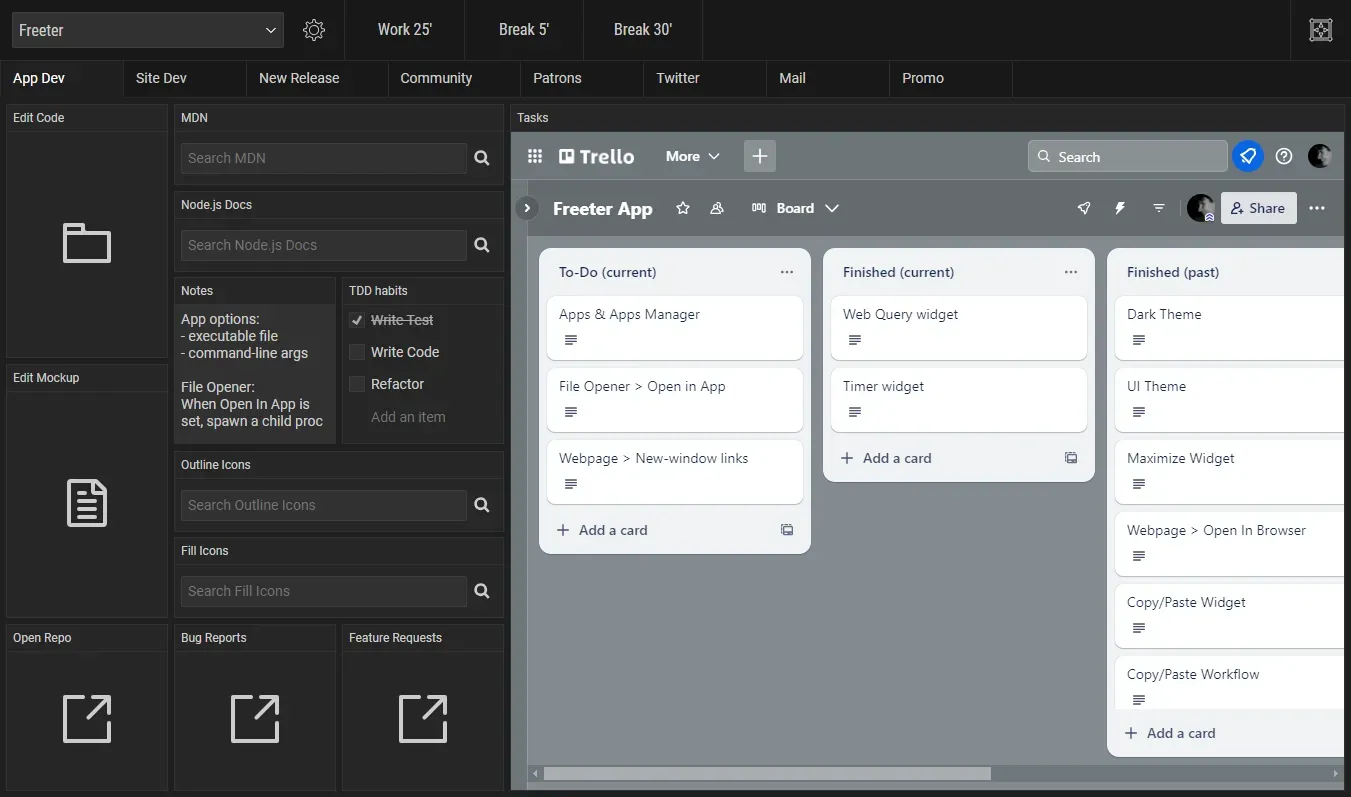
Set up workflows with widgets to access all your essential tools in one place.Webpage Widget – Embed web apps into your workflow and stay signed in to multiple accounts per project or widget.File Opener Widget – Open project files and folders in your editor with a single click.Web Query Widget – Perform templated searches on any website quickly.To-Do List Widget – Keep checklists and tasks organized without relying on memory.Commander Widget – Execute frequently used terminal commands with one click.Timer Widget – Break work into intervals with a simple countdown timer.Note Widget – Write quick notes or keep important reminders visible on your workflow screen. - Workflow Tabs
Organize complex projects or sub-projects by splitting workflows into multiple tabs for easy navigation. - Shelf
Keep common tools or widgets accessible across all workflows, such as timers or notes. - UI Theme
Switch between light and dark themes to suit your preference. - Privacy
Freeter respects your privacy—no telemetry, tracking, or data collection.
Here are some examples of how it can streamline daily tasks:
App / Website Development
A development workflow in Freeter brings all essentials together: task managers, project files, mockups, built-in documentation search, notes, and direct links to repositories, bug reports, and feature requests. Switching to “dev mode” is instantaneous, allowing you to focus solely on coding.
Email & Twitter DMs
Managing multiple accounts is simplified with embedded Gmail and Twitter sessions. Project-specific workflows stay logged in automatically, so you can reply to messages without juggling accounts or browsers.
New App Release
Freeter also supports release workflows, letting you execute build scripts, update community posts, review completed tasks, and follow a release checklist all within a single interface. This reduces the risk of missed steps and keeps releases smooth and organized
Switch Between Workflows
Freeter makes workflow switching effortless. A simple keyboard shortcut lets you drop into the context you need instantly, with no tab clutter, no friction, and no wasted energy.
Final Notes and Thoughts
I’ve found Freeter to be a game-changer for organizing my daily work. Instead of getting lost in tabs or hunting for project resources, I can switch workflows instantly and stay focused. It’s particularly useful for developers and creators who juggle multiple projects, accounts, and tools. Best of all, it’s completely free and open source, making it accessible for anyone looking to simplify their workflow.
Freeter is designed to be versatile and accessible, running smoothly on Windows, Linux, and Mac. Download Freeter and give it a shot. Let us know what you think and more importantly, leave a star on the Freeter Github repo!


Discussion