


I wanted an assistant that feels present. Something that lives in the same physical space as me. A half mirror turned out to be the perfect interface for that.
Demo (video)
Note: the demo video is silent. A narrated walkthrough and more details are available in the README.
MirrorMate demo
What you’ll get from this post
- Why MirrorMate is “voice-first” (and why that matters on a half mirror)
- Two practical deployments: easy cloud mode vs fully local mode
- How the config-driven design works (providers, RAG memory, plugins)
Introduction
I’ve been running a smart mirror for a while (MagicMirror style), but the “AI era” finally made the interaction feel natural enough that I wanted to rebuild it around conversation: wake word → talk → the mirror answers back.
That became MirrorMate: a personal assistant that lives behind a half mirror.
In the morning, I just say “Hey Mira” while brushing my teeth.
It tells me today’s weather, my first meeting, and whether I should grab an umbrella.
That’s the moment it stopped feeling like a demo and started feeling useful.
What is MirrorMate (why it’s fun)
MirrorMate is a personal assistant that lives behind a half mirror.
You talk to it, and it talks back — like a conversation embedded into your daily routine.
Technically, it’s a self-hosted app designed for a half mirror + display.
If you’ve ever thought “I want my own Alexa, but mine” or “give me a tiny JARVIS”, this is that itch.
Key features
- Voice-first UX: wake word “Hey Mira”
- Fully local option: Ollama + VOICEVOX, no cloud required
- RAG-based memory: extracts and stores personal facts, retrieves them when relevant
- Multi-provider: OpenAI/Ollama, Web Speech/Whisper/faster-whisper, VOICEVOX/OpenAI TTS
- Plugin system: add widgets (clock, etc.) without touching core
- Locale presets: switch language and get region defaults automatically
If you want the fastest path to a working mirror: start with the minimal cloud setup first, then migrate to fully local once the UX feels right.
Cost model (practical view)
- Minimal (Pi + OpenAI): low upfront cost, but you pay per usage
- Fully local (Pi + inference server): higher upfront cost, but recurring cost is basically $0/month (electricity aside)
Hardware
MirrorMate is software, but to make it a mirror, you need the usual smart-mirror hardware. I won’t re-explain the whole build (there are plenty of MagicMirror guides); here are the parts that mattered for me.
Rough shopping list
- Half mirror (two-way mirror)
- Display (HDMI is easiest)
- Raspberry Pi (for kiosk UI) + power supply
- Microphone + speakers (USB audio works fine)
- (Optional) Camera (for Vision Companion)
- Wood frame / mounts / paint
Reference video (build vibes): https://youtu.be/LTuvAoSJZDY?si=Ylj8iAy0gJ90LU6T
The one tip I’d repeat: choose the display first, then order the half mirror to match the outer dimensions. It makes the final result look “real”.
For reference, my half mirror order (Japan, custom cut):
| Type: Magic Mirror 3mm (Glass) 10% transmittance
| Shape: Rectangle
| Size: 255mm (W) × 432mm (H)
| Edge finish: C-cut (beveled)
| Unit price: ¥6,857
| Quantity: 1
| Subtotal: ¥6,857
|-------------------
| Shipping: ¥950
|-------------------
| Total: ¥7,807
| Tax: ¥780
| ━━━━━━━━━━━
| Grand total: ¥8,587
| ━━━━━━━━━━━
I’m currently using a Raspberry Pi 3 Model B+. In my setup, the Pi doesn’t run the heavy AI workloads—it’s mainly the UI/audio endpoint.
Photos (frame → paint → final)
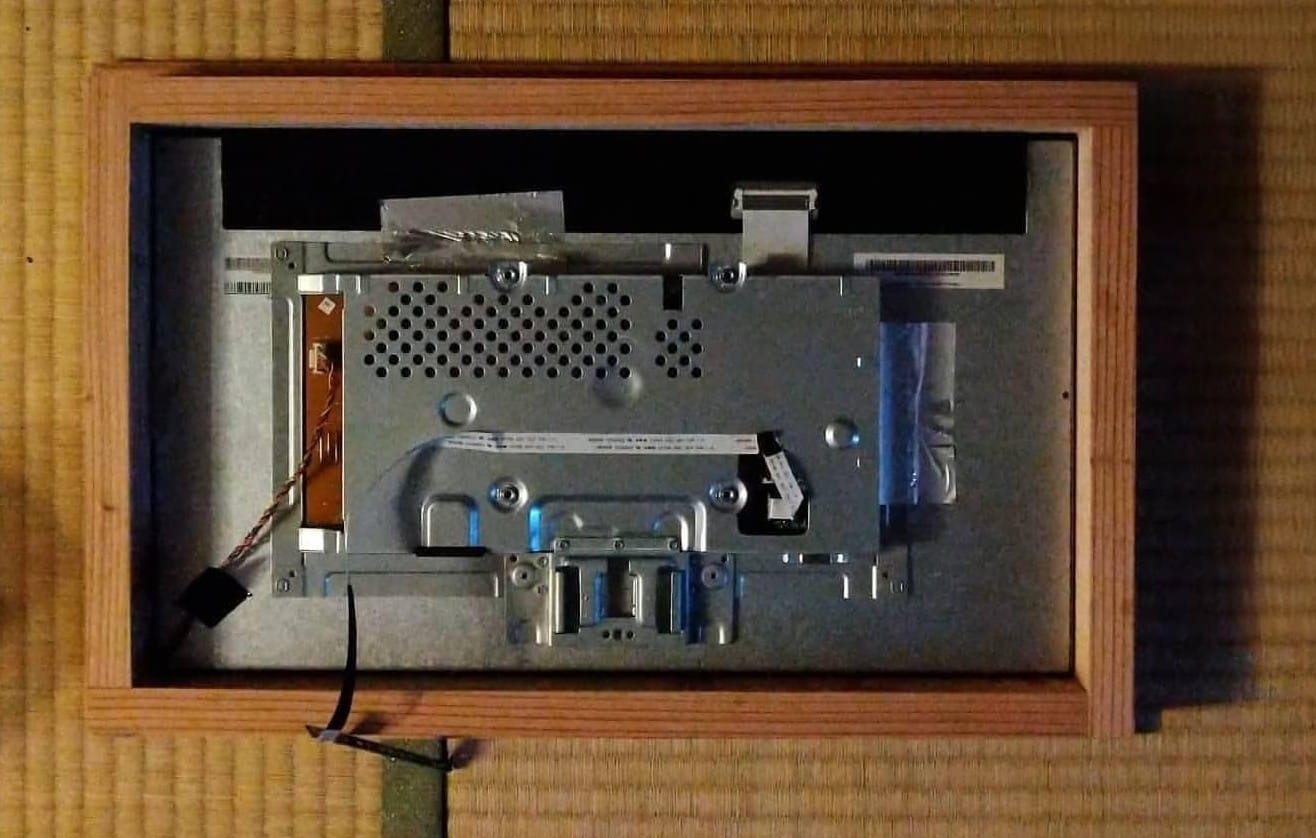

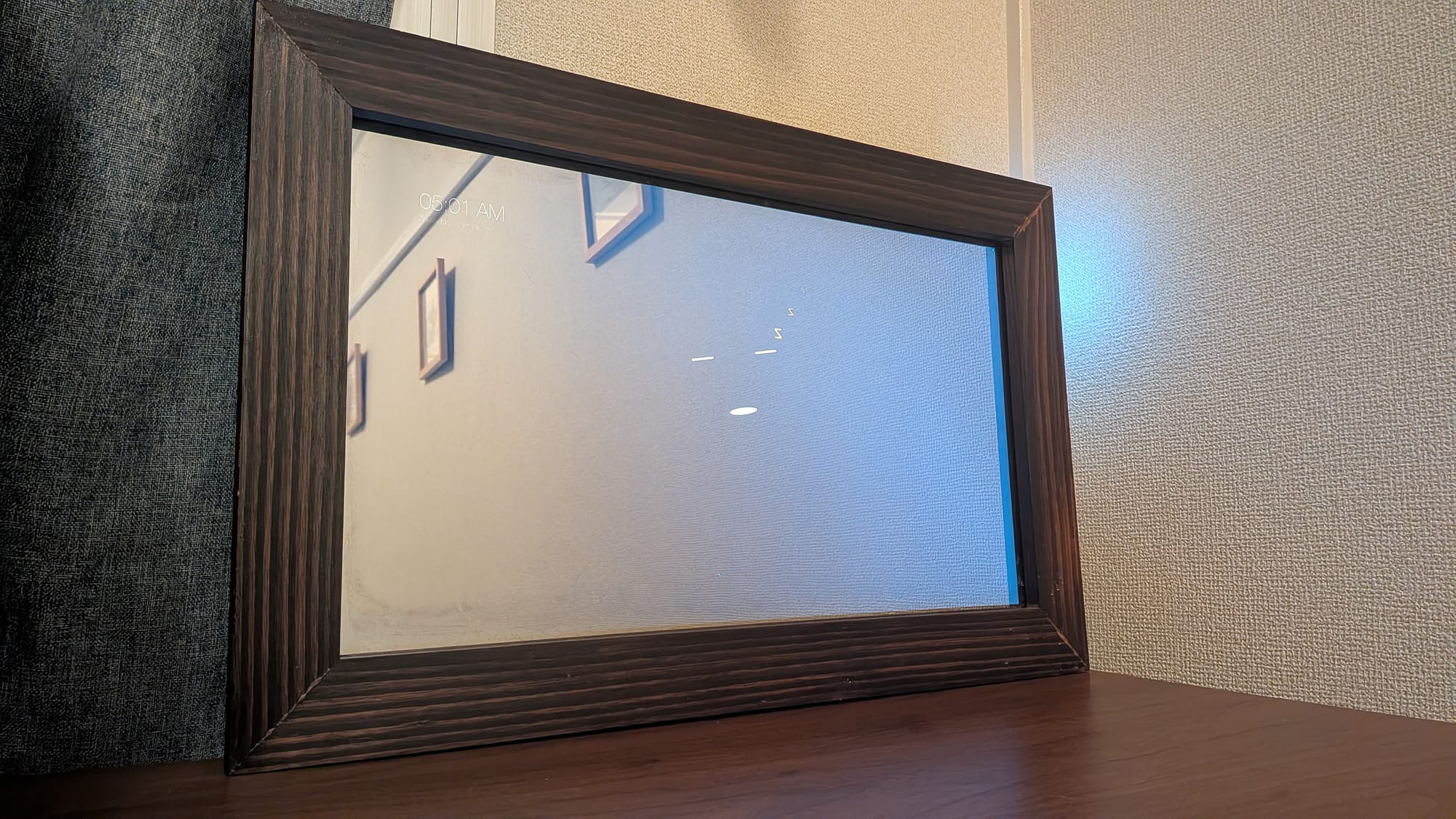
Architecture
Here’s the big picture.
Two deployment modes
MirrorMate supports two common setups:
1) Minimal (Raspberry Pi + OpenAI API)
- Run the app on the Pi
- Use OpenAI for LLM/TTS/STT
- Quick to start, but usage-based cost
2) Fully local (Raspberry Pi + a stronger machine)
- Run heavy services elsewhere (LLM/TTS/STT/embeddings)
- Use local Ollama, VOICEVOX, faster-whisper, etc.
- Higher upfront, but no cloud dependency
I run the fully local variant.
The key design choice is keeping the Raspberry Pi thin.
It only handles UI and audio I/O — everything heavy lives elsewhere.
This keeps the mirror responsive, silent, and easy to maintain.
┌─────────────────────────────────────────────────────────────────────┐
│                        Raspberry Pi                                 │
│  ┌───────────────┐  ┌─────────────┐  ┌────────────────────────────┐ │
│  │  Browser      │  │  Next.js 15 │  │  SQLite + Drizzle ORM      │ │
│  │  (Chromium)   │◄─┤  App        │◄─┤  - memories (RAG)          │ │
│  │  + Mic/Cam    │  │  Port 3000  │  │  - sessions                │ │
│  │  + MediaPipe  │  │             │  │  - user_settings           │ │
│  └───────────────┘  └──────┬──────┘  └────────────────────────────┘ │
│         ▲                  │                                        │
│         │                  │ Tailscale VPN                          │
└─────────┼──────────────────┼────────────────────────────────────────┘
          │                  ▼
          │   ┌───────────────────────────────────────────────────────┐
          │   │                    Inference server                   │
          │   │  ┌────────────┐  ┌───────────┐  ┌───────────────────┐ │
          │   │  │  Ollama    │  │ VOICEVOX  │  │  faster-whisper   │ │
          │   │  │  - LLM     │  │  TTS      │  │  STT              │ │
          │   │  │  - VLM     │  │  :50021   │  │  :8080            │ │
          │   │  │  :11434    │  │           │  │                   │ │
          │   │  └────────────┘  └───────────┘  └───────────────────┘ │
          │   │  ┌─────────────────────────────────────────────────┐  │
          │   │  │  PLaMo-Embedding-1B (Embedding Server) :8000    │  │
          │   │  └─────────────────────────────────────────────────┘  │
          │   └───────────────────────────────────────────────────────┘
          │
          └── Half Mirror + Monitor
If your Pi and inference box are on different networks, something like Tailscale makes it much easier—especially if you want to keep everything private and off the public internet.
Tech stack
| Category | Tech |
|---|---|
| Frontend | Next.js 15, React 19, Three.js |
| Backend | Node.js, SQLite (Drizzle ORM) |
| LLM | Ollama (e.g. gpt-oss:20b), OpenAI |
| TTS | VOICEVOX (JP), OpenAI TTS |
| STT | Web Speech API, OpenAI Whisper, faster-whisper |
| Embedding | PLaMo-Embedding-1B (via Ollama) |
| VLM | Ollama (llava, etc.) |
| Infra | Docker, Tailscale |
Software notes
UI tips for a half mirror
Half mirrors look best when you only “light up” what matters. I keep the background pure black (#000) and show just text/icons. For the avatar, I intentionally kept it simple—overly detailed designs tend to look uncanny or break in animation.
┌────────────────────────────────────────────────────┐
│                                                    │
│   ┌──────────┐                                     │
│   │ 10:30 AM │  ← Clock Plugin (top-left)          │
│   │ Jan 18   │                                     │
│   └──────────┘                                     │
│                                                    │
│                      ╭───╮                         │
│                     ( ◠‿◠ )  ← Avatar (center)     │
│                      ╰───╯                         │
│                                                    │
│   ┌────────────────────────────────────────────┐   │
│   │ "Good morning! Today is sunny..."          │   │
│   └────────────────────────────────────────────┘   │
│           ↑ Response Text (bottom)                 │
│                                                    │
│   Background: Pure Black (#000000)                 │
└────────────────────────────────────────────────────┘
Animation flow (simplified):
IDLE → LISTENING → THINKING → SPEAKING → LINGERING → IDLE
YAML-first configuration(why this matters)
I wanted to swap LLMs, TTS, and STT like Lego blocks — without touching application code.
MirrorMate is config-driven. You can switch providers without touching code.
config/app.yaml:
app:
  locale: "ja" # or "en"
config/providers.yaml (example):
providers:
  llm:
    provider: ollama # openai or ollama
    ollama:
      model: gpt-oss:20b
      baseUrl: "http://studio:11434"

  tts:
    provider: voicevox # openai or voicevox
    voicevox:
      speaker: 2
      baseUrl: "http://studio:50021"

  stt:
    provider: web # openai, local, or web

  embedding:
    provider: ollama
    ollama:
      model: plamo-embedding-1b
RAG-based memory (the “personal” part)
This is the feature I cared about most: the assistant should remember things (carefully).
Three memory types:
- Profile: durable preferences/traits (e.g. “likes coffee”, “morning person”)
- Episode: recent events (e.g. “watched a movie yesterday”, “business trip next week”)
- Knowledge: factual notes (e.g. “Project X deadline is end of January”)
The system extracts memory from conversations, stores embeddings, and retrieves relevant items on the next turn.
providers:
  memory:
    enabled: true
    rag:
      topK: 8
      threshold: 0.3
    extraction:
      autoExtract: true
      minConfidence: 0.5
Locale presets
Changing app.locale updates a bunch of defaults at once.
When ja:
- Timezone: Asia/Tokyo
- Weather location: Tokyo
- Time format: 24h
- STT language: ja-JP
When en:
- Timezone: America/Los_Angeles
- Weather location: San Francisco
- Time format: 12h
- STT language: en-US
Character configuration
The assistant personality is also YAML:
character:
  name: "Mira"
  description: "A friendly mirror assistant"
  personality:
    - "Kind and warm"
    - "Curious"
  speech_style:
    - "Casual and approachable"
    - "Keep responses concise"
  background: |
    You are an AI assistant living in a mirror.
    Support the user's daily life.
Rule engine
You can define keyword-triggered workflows:
rules:
  morning_greeting:
    description: Summarize the day on a morning greeting
    triggers:
      keywords:
        - おはよう
        - good morning
    actions:
      - module: time
      - module: weather
      - module: calendar
    response_hint: |
      Explain the following in a friendly way:
      - Today's weather
      - Today's schedule
Plugins
Plugins let you extend features without bloating the core.
Clock plugin:
plugins:
  clock:
    source: github:orangekame3/mirrormate-clock-plugin
    enabled: true
    position: top-left
    config:
      showSeconds: false
      showDate: true
Vision Companion (camera-based):
plugins:
  vision-companion:
    source: local:vision-companion
    enabled: true
    position: hidden
Built-in integrations
- Weather (Open-Meteo)
- Calendar (Google Calendar)
- Web search (Tavily)
- Reminders (polling)
- Optional Discord sharing
In my experience, once the assistant has your “daily context” (calendar, weather, reminders), it stops being a demo and starts feeling like something you actually use.
Setup (quick path)
If you just want to see it working quickly (Pi + OpenAI):
- Set
llm/stt/ttstoopenaiinconfig/providers.yaml - Add your API keys to
.env - Keep the Pi’s job simple: show the UI and handle audio
Clone
git clone https://github.com/orangekame3/mirrormate.git
cd mirrormate
Install dependencies
bun install
Configure environment
cp .env.example .env
Run
bun dev
Docker:
docker compose up -d
Move to fully local
- Run Ollama / VOICEVOX / faster-whisper / embedding server on a separate machine
- Point the Pi to those endpoints over HTTP
- If networks differ, connect via Tailscale (avoid exposing services publicly)
Wrap-up
Building MirrorMate made me realize how different an assistant feels when it’s physically present in your space — not just another app or speaker.
If you enjoy building things that live in your environment, not just on your screen, you might enjoy MirrorMate.
If this sounds fun, take a look at the repo:
https://github.com/orangekame3/mirrormate


Discussion