


I launched BorgBase, a hosting service for encrypted backups, almost 10 years ago. What started as a simple idea, give people a place to store their Borg repos — turned into a front-row seat to how backups actually work (and fail) in the real world. Along the way I contributed to BorgBackup itself and built Vorta, a desktop GUI for Borg on macOS and Linux.
After thousands of support conversations and watching how people piece together their backup setups, I kept running into the same frustrations. Not with any single tool, but with the ecosystem as a whole. So I built something new.
Today I'm releasing Vykar, a Rust-based backup client that tries to take the best ideas from Borg, Borgmatic, Restic, and Rustic then ship them as one tool.
The problem with backup tools today
If you've ever set up deduplicated backups on a server, you know the drill. You pick a backup tool. Then you pick a second tool to actually manage it. Borg needs Borgmatic for configuration and scheduling. Restic needs Autorestic or resticprofile just to get a YAML config file. You end up with something like restic + resticprofile + healthchecks.io + systemd timers + a custom bash script for database dumps. That's five moving parts for what should be a solved problem.
Each tool has real strengths. Borg gives you excellent compression and storage efficiency, but it's single-threaded and SSH-only, no native S3 support, no Windows. Restic has great backend flexibility and is fast at restores, but its prune operation can take hours on large repos and it still doesn't ship with a config file after all these years. Kopia has a nice built-in web UI and fast incremental backups, but we've seen users hit reliability issues with corrupted repositories.
And then there's the database question. If you're running Postgres or MySQL in Docker (and let's be honest, most self-hosters are), backing up those databases is still a "write your own bash script" situation. Borgmatic is the only tool that handles database dumps natively, but it's a wrapper around Borg, not a standalone solution.
None of these tools are bad. I've recommended all of them to BorgBase users over the years. But none of them feel complete either.
What Vykar does differently
Vykar is a single binary that handles configuration, scheduling, backup, restore, and monitoring hooks, no wrappers needed. You write one YAML config file and you're done. It includes a built-in desktop GUI and a WebDAV server for browsing snapshots, so you don't need a separate third-party app to restore files.
On the backend side, Vykar supports local folders, S3 (any compatible provider), SFTP, and a dedicated REST server. The BorgBase REST server can run maintenance operations like compaction and integrity checks server-side, so you don't need to download your backup data just to prune old snapshots.
Other things worth mentioning: concurrent multi-client backups to the same repo (only the brief commit phase is serialized), built-in scheduling via vykar daemon so you don't need cron, rate limiting for CPU, disk I/O, and network bandwidth, and cross-platform support for Linux, macOS, and Windows.
Performance
Vykar is written in Rust and it shows in the benchmarks. We tested against Borg, Restic, Rustic, and Kopia on the same hardware (Intel i7-6700, NVMe drives, 5 runs averaged).
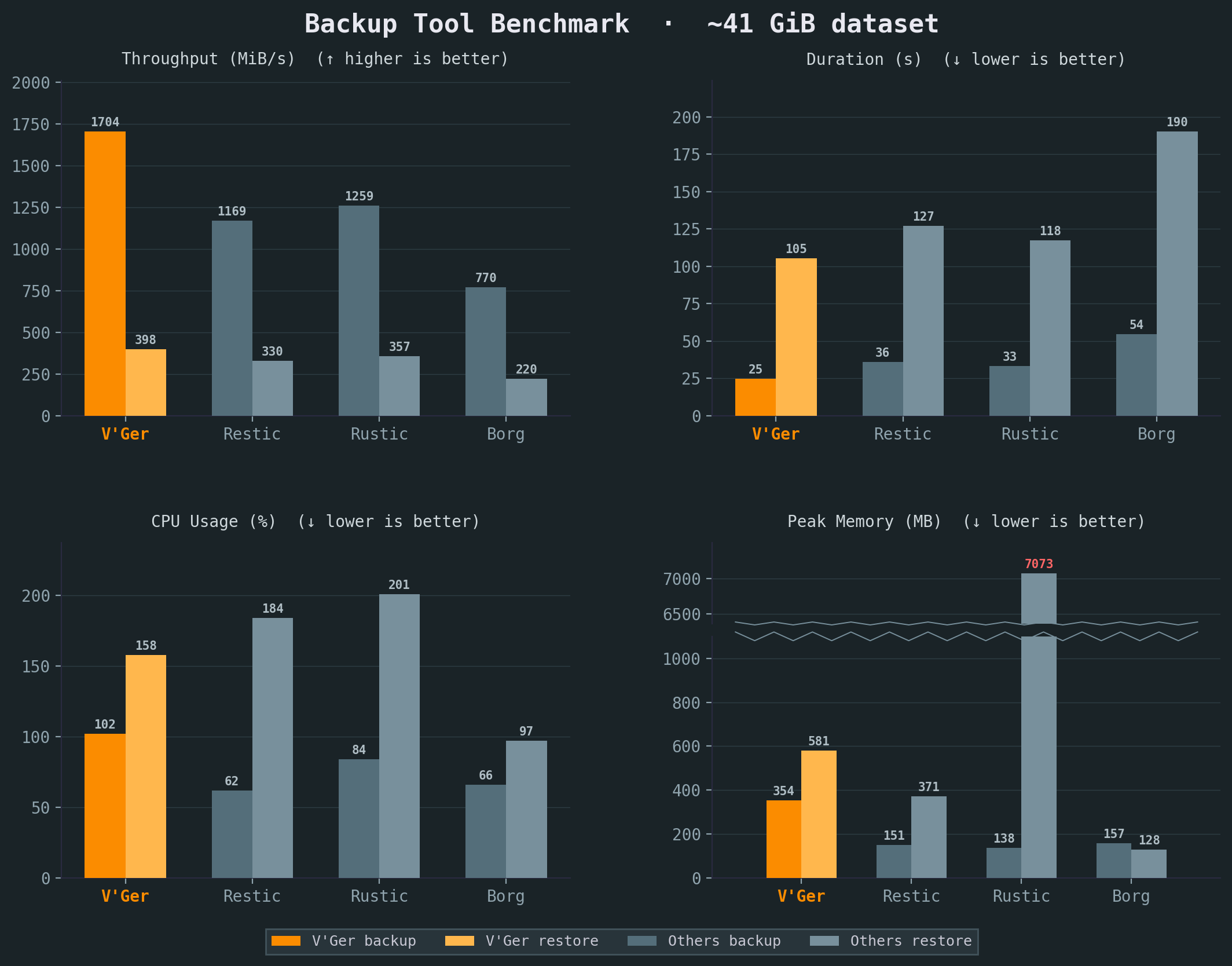
Vykar came out fastest for both backup and restore with the lowest CPU usage. Memory is competitive but not the lowest. Borg still wins there since it runs single-threaded and doesn't need to buffer data across parallel pipelines. Full benchmark details and the benchmark script are available at vykar.borgbase.com.
Getting started
Installation takes about a minute. Grab the binary via the install script or download it directly from the release page:
curl -fsSL https://vykar.borgbase.com/install.sh | shThen create a config file:
vykar configThis generates a YAML config with sensible defaults. You can scope it to a project, your user, or the whole system. Add the folders you want backed up, point it at a repository, and you're ready:
vykar init
vykar backup
Or to back up any folder spontaneously:
vykar backup /some/folder
That's it for a basic setup. The full quickstart guide covers more options, and the backends page walks through S3, SFTP, and REST server configuration.
Backing up Docker databases without bash scripts
This is the part I'm most excited about for self-hosters. Vykar has a feature called command dumps that lets you stream a command's stdout directly into the backup — no temporary files, no cleanup scripts. It's the same concept Borgmatic introduced for database dumps, but built into the core tool and generic enough to work with anything.
Here's what backing up a Postgres container looks like in your Vykar config:
sources:
  - label: app-database
    command_dumps:
      - name: mydb.dump
        command: "docker exec my-postgres pg_dump -U myuser -Fc mydb"
That's it. Vykar runs the command, captures the output, deduplicates, compresses, and encrypts it — all streamed, no temp files hitting disk. The same pattern works for MySQL, MariaDB, and MongoDB:
sources:
  - label: app-database
    command_dumps:
      - name: mydb.sql
        command: "docker exec my-mysql mysqldump -u root -p\"$MYSQL_ROOT_PASSWORD\" mydb"
sources:
  - label: app-database
    command_dumps:
      - name: mydb.archive.gz
        command: "docker exec my-mongo mongodump --archive --gzip --db mydb"
If you're running multiple containers, you can give each its own source entry with separate labels and retention policies. For example, keep database dumps for 30 days but only keep nginx config snapshots for a week:
sources:
  - path: /var/lib/docker/volumes/nginx_config/_data
    label: nginx
    retention:
      keep_daily: 7

  - label: app-database
    command_dumps:
      - name: mydb.dump
        command: "docker exec my-postgres pg_dump -U myuser -Fc mydb"
    retention:
      keep_daily: 30

  - path: /var/lib/docker/volumes/uploads/_data
    label: uploads
For containers that write to a volume but can tolerate a brief stop, hooks let you pause and resume around the backup:
sources:
  - path: /var/lib/docker/volumes/wiki_data/_data
    label: wiki
    hooks:
      before: "docker stop wiki"
      after:  "docker start wiki"
More recipes for Btrfs/ZFS snapshots, Redis, SQLite, monitoring with healthchecks.io and ntfy, and low-resource background backups are in the recipes page.
Try it out
Vykar is open source and still early, I'd recommend testing it alongside your existing backup tool rather than replacing anything yet. But the core functionality is solid and it's what we're building all future BorgBase features around.
Source code is on GitHub. A star would mean a lot if you find the project interesting.
If there's a feature you'd want to see in a backup tool, now is the best time to shape the roadmap. Open an issue or let me know in the comments.


Discussion