


If you have flown DJI drones for any length of time, you already know the feeling: your flight history is technically “there,” but not really usable. Logs live in different folders, different formats, different apps, and the moment you want to answer a simple question like “Which battery is aging fastest?” or “How high was that windy-lake flight last October?” you end up digging through exports, screenshots, and half-remembered filenames.
OpenDroneLog is built for that exact mess. It is a high-performance flight log analyzer and dashboard that lets you organize and study DJI flight logs plus Litchi CSV exports in one private place. It is available as a Tauri v2 desktop app and also as a Docker-deployable web app, with DuckDB and React doing the heavy lifting under the hood.
What is OpenDroneLog
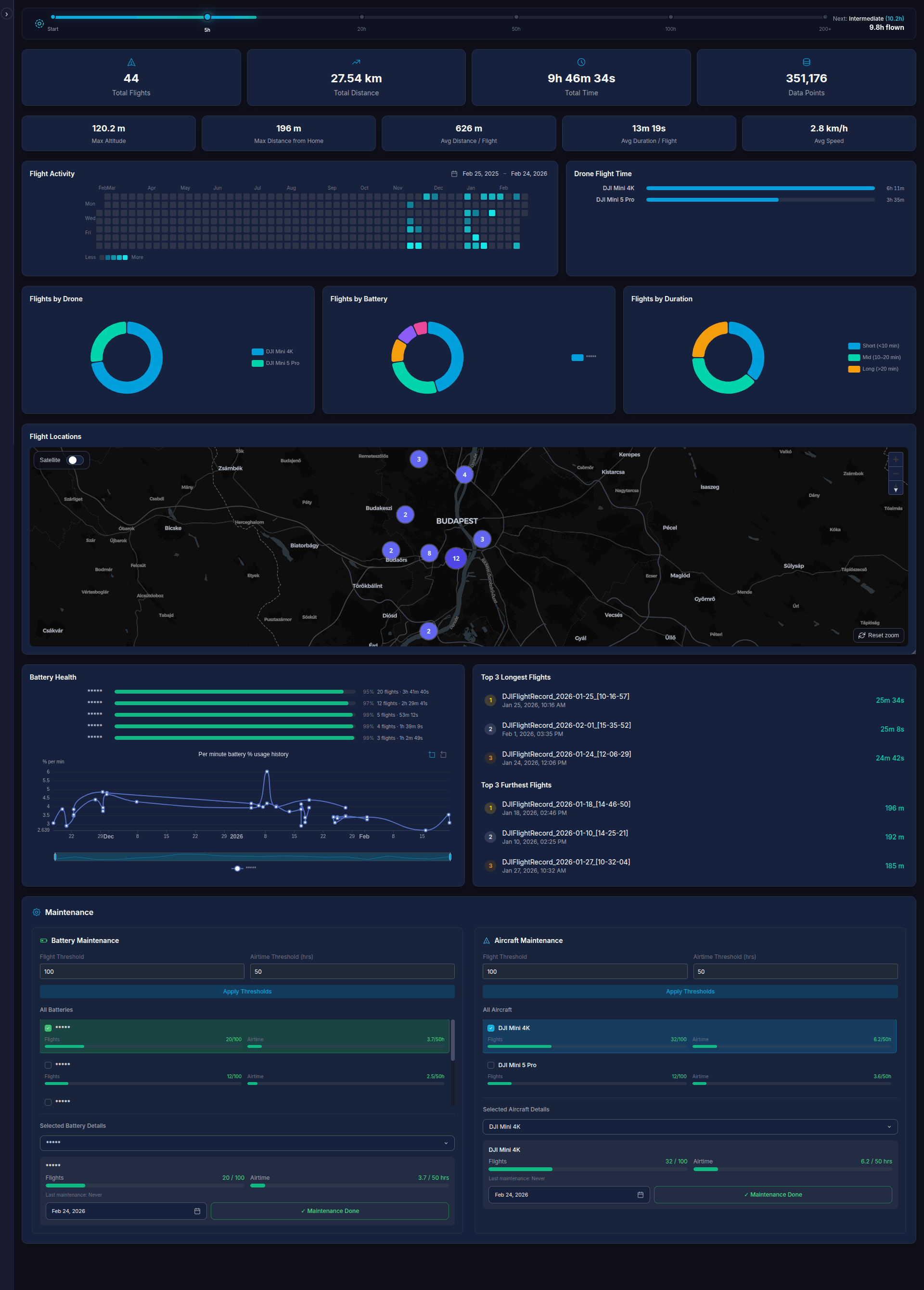
At its core, OpenDroneLog is a “bring your own logs” dashboard. You import DJI logs (including .txt flight logs) and Litchi CSV exports, and it builds a local database so you can browse flights, filter them, replay them on a map, and dig into telemetry without shipping your data to somebody else’s cloud. The project calls this “local-first storage,” with all data kept in a local DuckDB database and no cloud upload required for normal use.
The problem it solves
OpenDroneLog turns raw flight records into something you can actually learn from:
- Interactive flight maps with terrain, satellite toggles, and replay controls (including telemetry overlays).
- Telemetry charts for speed, height, battery health, cell voltages, GPS, distance-to-home, and more, with zoomable timelines.
- Smart deduplication so repeated imports do not balloon your library, using identifiers like drone serial, battery serial, and start time.
- Practical “fleet management” features like per-battery health tracking and maintenance tracking with thresholds.
- Exports in common formats (CSV, JSON, GPX, KML), plus shareable report outputs like a printable HTML flight report.
The result is less “I have logs” and more “I can answer questions about my flying.”
How it can be self-hosted
OpenDroneLog’s self-hosted mode is a real web deployment, not a flimsy demo. The Docker version uses an Axum REST backend, with Nginx serving the frontend and proxying API requests.
Get started with Docker Compose:
services:
  open-dronelog:
    image: ghcr.io/arpanghosh8453/open-dronelog:latest
    container_name: open-dronelog
    hostname: open-dronelog
    ports:
      - "8080:80"
    volumes:
      - drone-data:/data/drone-logbook

      # Uncomment and set your sync folder path to enable automatic log import
      # - /path/to/your/drone/logs/on/host/device:/sync-logs:ro

      # Uncomment to persist uploaded files to a host folder
      # - /path/to/uploaded/files:/data/drone-logbook/uploaded

    environment:
      - DATA_DIR=/data/drone-logbook
      - RUST_LOG=info
      - KEEP_UPLOADED_FILES=true

      # Uncomment to enable automatic sync from mounted folder
      # - SYNC_LOGS_PATH=/sync-logs

      # Uncomment to enable scheduled sync (cron expression, default: every 8 hours)
      # - SYNC_INTERVAL=0 0 */8 * * *

    restart: unless-stopped

volumes:
  drone-data:
The quick-start path is straightforward: run the container, map a port, and mount a persistent volume so your DuckDB database survives upgrades and restarts. The project documents a named volume mapped to an internal data directory, and it explicitly notes that your data persists unless you delete the volume.
If you want the “drop logs into a folder and let it ingest automatically” workflow, the Docker setup supports mounting a read-only sync folder and enabling scheduled sync with a cron expression via environment variables like SYNC_LOGS_PATH and SYNC_INTERVAL.
A small, important footnote
OpenDroneLog is licensed under AGPL-3.0, which matters if you modify and run it as a network service. Also, the README includes guidance for generating your own DJI Developer API key if you prefer not to rely on a bundled key.
If you have ever wanted a private, searchable “flight brain” you can run on your own machine, this project is aiming directly at that need, with enough polish that it feels like a tool you can actually live in, not just test once and forget.
 arpanghosh8453
 Arpan Ghosh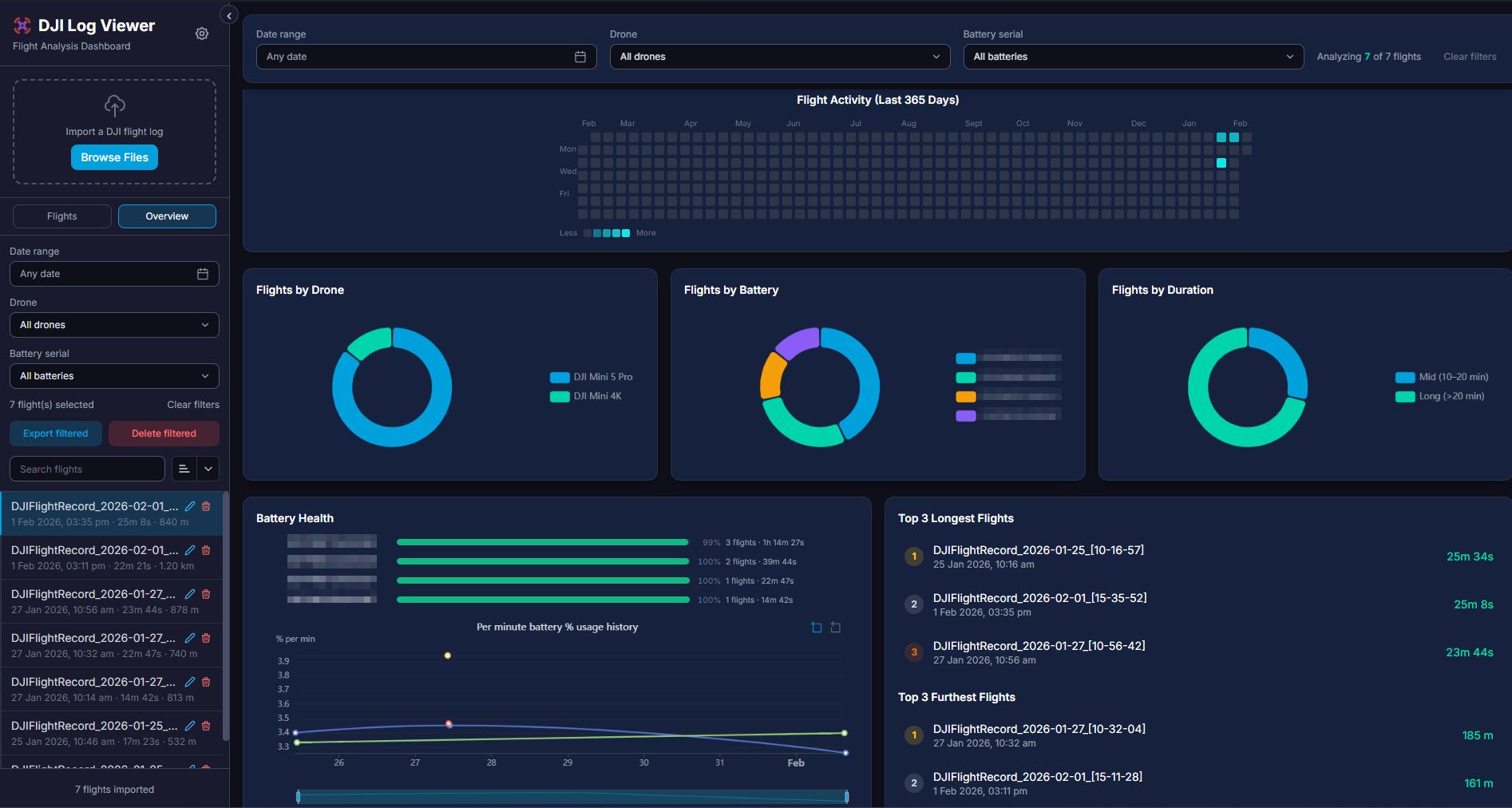


Discussion