


Introducing Zonos v0.1, a groundbreaking open-source text-to-speech model that has been extensively trained on over 200,000 hours of diverse multilingual speech data. With its exceptional expressiveness and quality rivaling or even exceeding industry leaders, Zonos v0.1 sets a new standard in the field of artificial intelligence-powered voice synthesis.
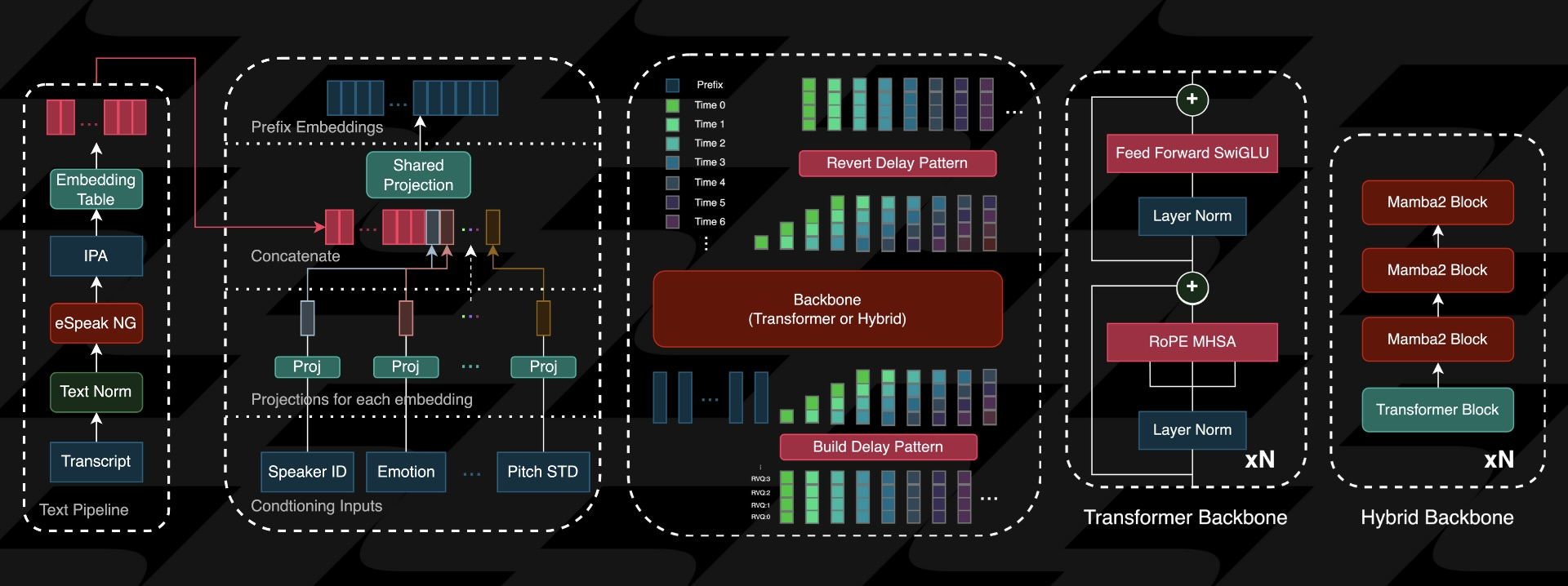
With its advanced capabilities, the Zonos model generates remarkably natural sounding speech from text prompts when provided with a speaker embedding or audio prefix, seamlessly mirroring real life conversations. Specifically, it can accurately clone speech patterns from reference clips just a few seconds long, enabling precise replication of nuances in tone and inflection. The model's conditioning setup also allows for meticulous control over key aspects of the output, including speaking pace, pitch variation, audio fidelity, and even emotional expression, capturing subtle shades of happiness, fear, sadness, and anger.
Zonos Key Features
- Zero-Shot TTS : Input text and speaker audio (10-30s) for high-quality speech synthesis.
- Advanced Speaker Matching : Add an audio prefix to elicit specific behaviors, such as whispering.
- Multilingual Support : English, Japanese, Chinese, French, and German supported.
- Emotion Control : Fine-grained control over speaking rate, pitch, audio quality, and emotions like happiness, anger, sadness, and fear.
- Real-Time Performance : ~2x real-time factor on RTX 4090, generating 2 seconds of audio per 1 second of compute time.
- Easy Deployment : Simple installation using the Docker file in the repository.
Prerequisites
These are the recommended system requirements to run Zonos
- NVIDIA GPU with at least 6GB of VRAM
- Hybrid model additionally requires a 3000-series or newer Nvidia GPU
- Some Linux experience
I have a NVIDIA GeForce RTX 2080 Ti with 11GB of VRAM. This means I can run the Zonos-v0.1-transformer model but not the Zonos-v0.1-hybrid model because I do not have a 3000 or later series NVIDIA card.
According to this Github issue it is due to the lack of support for older NVIDIA architectures.
This is due to lack of support for architectures older than NVIDIA Ampere. We are working to release a pure pytorch version of the transformer that will run on MLX, older Nvidia gpus, and AMD.
Keep in mind that while Zonos can be run on a standard CPU if you have sufficient free RAM, the performance will be significantly impacted. Running solely on a CPU may also introduce latency, making it less suitable for real time applications or interactive use. GPU acceleration is still recommended for optimal results.
Install Zonos using Docker
If you don't have Docker installed and need help getting started, I recommend checking out our self-hosting guides for beginners. These guides cover the basics of setting up Docker on your server. They're designed to help you get up and running smoothly, even if you're new to self-hosting. It's also good practice to use UID and PID but for the sake of this guide we are using root on a local machine that will NOT be exposed.
Use the following steps to install Zonos:
Open your terminal and navigate to a directory where you want to install Zonos. From here, run the following commands:
git clone https://github.com/Zyphra/Zonos.git
cd Zonos
services:
  zonos:
    build:
      context: .
      dockerfile: Dockerfile
    container_name: zonos_container
    runtime: nvidia
    network_mode: "host"
    stdin_open: true
    tty: true
    command: ["python3", "gradio_interface.py"]
    environment:
      - NVIDIA_VISIBLE_DEVICES=0
      - GRADIO_SHARE=False
docker compose up
If this config does not work for you, try using the following. I had to remove the "runtime: nvidia" because it was throwing errors. I then added the following to the Docker Compose config to make it work. Additionally, I removed the "network_mode: host" section so I can expose the ports on the server.
    deploy:
      resources:
        reservations:
          devices:
            - driver: nvidia
              count: 1
              capabilities: [gpu]
So the entire Docker Compose config looks like this:
services:
  zonos:
    build:
      context: .
      dockerfile: Dockerfile
    container_name: zonos_container
    stdin_open: true
    tty: true
    command: ["python3", "gradio_interface.py"]
    environment:
      - NVIDIA_VISIBLE_DEVICES=0
      - GRADIO_SHARE=False
    ports:
      - 7860:7860
    deploy:
      resources:
        reservations:
          devices:
            - driver: nvidia
              count: 1
              capabilities: [gpu]
docker compose up
This will start Zonos on your server IP on port 7860. Keep in mind when you load the Gradio interface for the first time it will need to download the Zyphra/Zonos-v0.1-transformer model which is about 3.6GB so it may take a couple minutes.

Here you can see the different settings on the Gradio dashboard. I started by placing the opening statement of this article into the "Text to Synthesize" box. I tweaked a few of the conditioning parameters and emotion sliders. I then click generate. It takes 2.2k steps or 148 seconds. Listen to the sample below.

By sliding the "Neutral" slider downwards, you can subtly shift the voice towards a more masculine tone, allowing for greater nuance and expressiveness in your speech synthesis.
Stats for Nerds
While generating the audio, Zonos uses just over 7.5GB of VRAM on my 2080ti.

Final Notes and Thoughts
I've got to say, Zonos is killing it as an alternative to ElevenLabs. The capabilities are insane, and I'm excited to see where the team takes it next! If you're already using Zonos and loving it, be sure to swing by the Zonos GitHub repo and give the project a star. Every star counts, and it's awesome to have a community behind this project!
I also recommend reading more about the Zonos v0.1 models here on their blog.


Discussion