


Hey everyone. It's another file server with encryption! I'll think of something better to write here later.
What is YeetFile?
YeetFile is a secure, end-to-end encrypted file storage solution developed by Ben Busby, also behind Whoogle Search and other popular open source and self-hosted projects. Users have the flexibility to host YeetFile themselves using Docker or access it through its publicly available instance at https://yeetfile.com .

YeetFile Core Features
For those who prefer to host their own instance, YeetFile offers the following self-hosting features:
• Easy deployment using a simple Docker-based setup
• Server-specific passwords for added security
• Limit control: set maximum users per server and user vault size/sending bandwidth
• Highly customizable with environment variables (see README)
• Flexible storage backend options: local storage or Backblaze B2
Another advantage of YeetFile is its complementary Command-Line Interface (CLI) tool, which provides full access to all web-based features without requiring a graphical interface or login credentials. For those who prefer the terminal for file management or have security concerns, the CLI tool offers a secure and seamless way to interact with YeetFile's capabilities, eliminating the need to log in from a browser.
Install YeetFile using Docker Compose
If you don't have Docker installed and need help getting started, I recommend checking out our self-hosting guides for beginners. These guides cover the basics of setting up Docker on your server. They're designed to help you get up and running smoothly, even if you're new to self-hosting.
To get the best out of YeetFile, make sure it uses HTTPS (a secure way to connect). If you want extra peace of mind, consider using Cloudflare to sort out your domain's security settings. This is especially important if you plan to use YeetFile to store sensitive info like passwords.
Use the following Docker Compose to install YeetFile:
services:
  api:
    image: ghcr.io/benbusby/yeetfile:latest
    container_name: yeetfile
    restart: unless-stopped
    ports:
      - 8090:${YEETFILE_PORT:-8090}
    expose:
      - 8090
    depends_on:
      db:
        condition: service_healthy
    environment:
      - YEETFILE_DEBUG=${YEETFILE_DEBUG:-0}
      - YEETFILE_STORAGE=${YEETFILE_STORAGE:-local}
      - YEETFILE_DEFAULT_USER_STORAGE=${YEETFILE_DEFAULT_USER_STORAGE:--1}
      - YEETFILE_DEFAULT_USER_SEND=${YEETFILE_DEFAULT_USER_SEND:--1}
      - YEETFILE_HOST=${YEETFILE_HOST:-0.0.0.0}
      - YEETFILE_PORT=${YEETFILE_PORT:-8090}
      - YEETFILE_DB_USER=${YEETFILE_DB_USER:-postgres}
      - YEETFILE_DB_PASS=${YEETFILE_DB_PASS:-postgres}
      - YEETFILE_DB_NAME=${YEETFILE_DB_NAME:-yeetfile}
      - YEETFILE_DB_HOST=${YEETFILE_DB_HOST:-db}
    volumes:
      - ./volumes/yeetfile/uploads:/app/uploads

  db:
    image: postgres:16-alpine
    container_name: yeetfile-db
    restart: unless-stopped
    volumes:
      - ./volumes/yeetfile/data:/var/lib/postgresql/data
    environment:
      - POSTGRES_HOST_AUTH_METHOD=${POSTGRES_HOST_AUTH_METHOD:-md5}
      - POSTGRES_USER=${YEETFILE_DB_USER:-postgres}
      - POSTGRES_PASSWORD=${YEETFILE_DB_PASS:-postgres}
      - POSTGRES_DB=${YEETFILE_DB_NAME:-yeetfile}
    expose:
      - 5432
    healthcheck:
      test: [ "CMD-SHELL", "pg_isready -U postgres" ]
      interval: 3s
Be sure to change volumes and ports as needed. I also recommend checking the YeetFile Github repo for the latest Docker Compose configuration to make sure it's up to date.
YeetFile Web UI Tour
Launch YeetFile on the domain you setup and you will be presented with the main page where you can send encrypted text without making an account.

Notice the Upload File option is greyed out? This is because you must sign up to upload files. This is to keep unwanted individuals from uploading random files to your server.


When you sign up, YeetFile assigns a random ID that you must write down and save. I'm not too excited about this feature but that's how it works. I have to go hunting for the ID I wrote down just to log into YeetFile. If you plan to use this for your own personal use, that might be a deterrent.

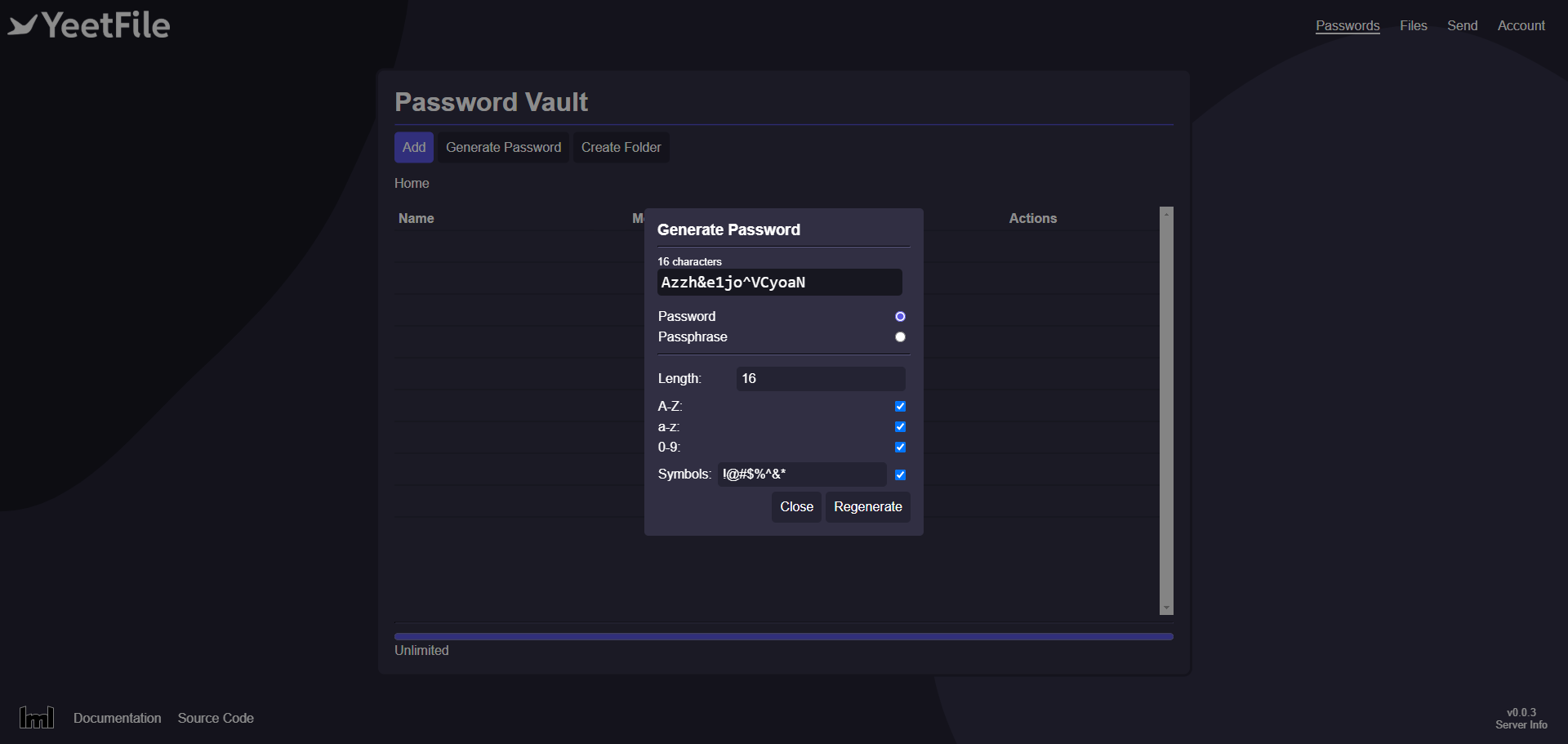
What I like about YeetFile is it's basic functionality. You can add passwords to your vault quick and easy and even generate a random password.

The file vault is clean, allowing you to upload files directly or create folders to be more organized. You can share files with other users and even grant them access to modify text files. You can view PDF, docs, txt and other text based files.

If having a random 16 digit ID isn't secure enough for you, you can enable 2FA in your account settings. Here, you can also view your stats and delete your account.
Final Notes and Thoughts
Overall, I'm thoroughly impressed with YeetFile's design, functionality, and features. However, its overly restrictive account settings make it less suitable for my personal use in a home lab setting. I believe, however, that YeetFile would be an excellent choice for production environments where the level of security offered is valuable.
 benbusby
A big special thank you to Markus for his donation recently! Thank you Markus!


Discussion